EPFO Employer Login – Complete Guide for Employers to Access EPFO Services Online
Managing employee Provident Fund (PF) contributions is a legal responsibility for every EPFO-registered establishment. To make this process simple, transparent, and fully digital, the Employees’ Provident Fund Organisation (EPFO) provides a dedicated Employer Login facility through its Unified Portal.
Using the EPFO employer login, companies can submit monthly PF contributions, upload ECR returns, manage employee records, and ensure compliance with EPFO regulations—all without visiting any EPFO office. This online system saves time, reduces paperwork, and helps employers maintain accurate PF records for their workforce.
In this complete guide, you will learn what EPFO employer login is, who can use it, what details are required, how to log in step by step, services available after login, common login issues, and why employer login is crucial for PF compliance.
What Is EPFO Employer Login?
EPFO Employer Login is an online access system designed specifically for employers and registered establishments. It allows companies to manage all EPF-related tasks for their employees through the official EPFO portal.
This login is different from the employee (member) login and is strictly meant for organizations that are registered under EPFO.
Through the employer portal, establishments can:
- Deposit monthly PF contributions
- Upload Electronic Challan-cum-Return (ECR)
- Register new employees under EPFO
- Update employee details
- Track payments and compliance status
The employer login acts as a bridge between employees, employers, and EPFO, ensuring accurate PF deductions and timely deposits.
Who Can Use EPFO Employer Login?
The EPFO employer login facility is available to:
- Private companies registered under EPFO
- Government and semi-government organizations
- Factories and establishments covered under the EPF Act
- Contractors and firms managing EPF-covered employees
To use this service, the establishment must:
- Be registered with EPFO
- Have a valid Establishment ID
- Possess employer login credentials issued by EPFO
Only authorized persons such as HR managers, payroll officers, or company owners should access this login.
Details Required for EPFO Employer Login
Before logging in, employers should keep the following information ready:
- Establishment ID (EPFO registration number)
- Employer username
- Password
- Captcha code (displayed on login page)
- Stable internet connection
These credentials are usually created at the time of EPFO registration and should be kept confidential to avoid misuse.
Step-by-Step Process for EPFO Employer Login
Logging into the EPFO employer portal is simple if the correct steps are followed.
How to Login as an Employer on EPFO Portal
Visit the official EPFO Unified Portal
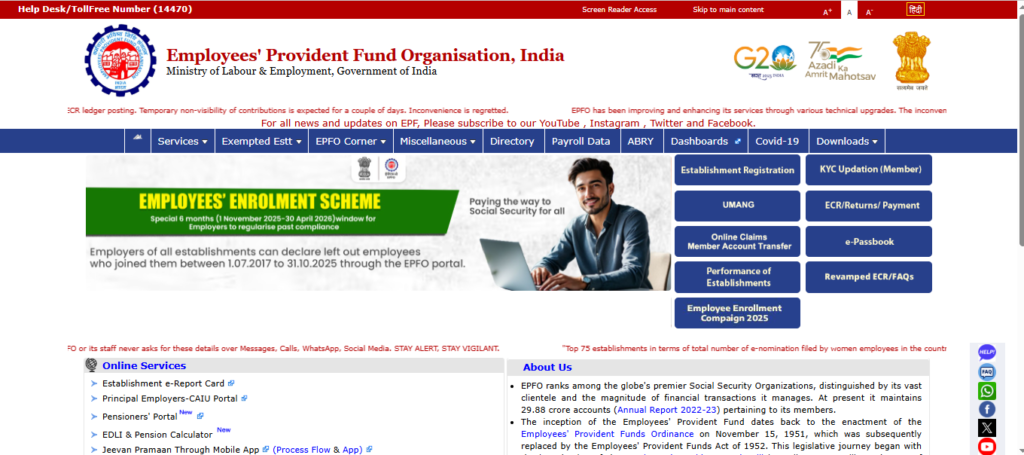
Click on the Services section
Select For Employers from the menu
Click on Employer Login / ECR Login
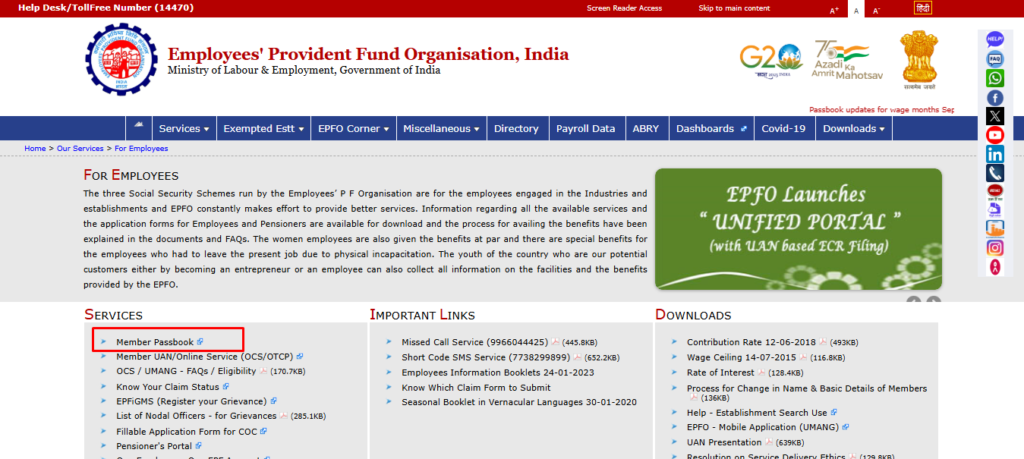
Enter your username, password, and captcha code
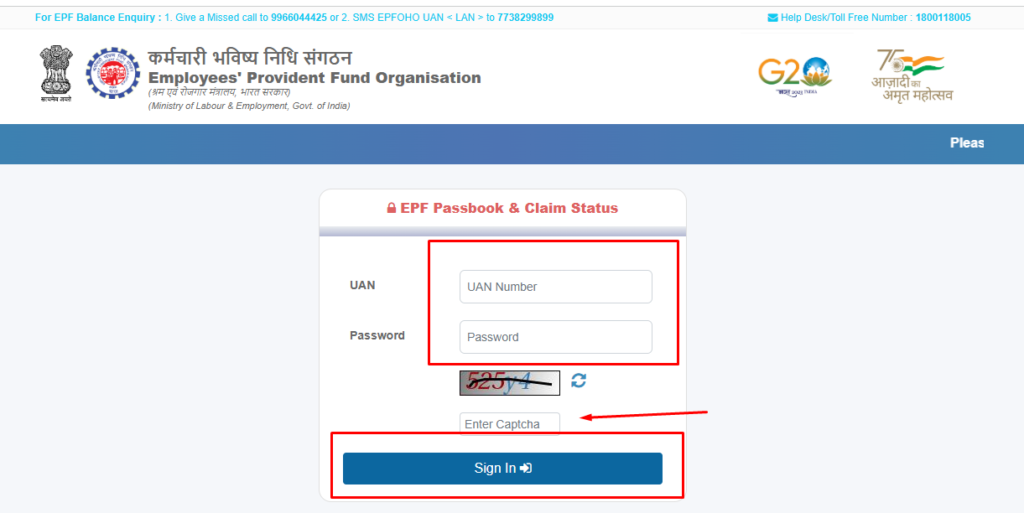
Click on Sign In
After successful authentication, the employer dashboard will open, giving access to all EPFO employer services.
Services Available After EPFO Employer Login
Once an employer successfully logs in to the EPFO Unified Portal, they gain access to a centralized dashboard that allows them to manage all Provident Fund–related responsibilities in one place. This online system eliminates paperwork, reduces errors, and ensures timely compliance with EPFO regulations.
The employer dashboard is designed to support both small businesses and large organizations by offering tools for contribution filing, employee management, payments, and compliance tracking. Below is a detailed explanation of the key services available after EPFO employer login.
Key EPFO Employer Services Explained
Below is a detailed overview of the key EPFO employer services available after login. These services are designed to help employers manage PF contributions, employee records, and statutory compliance efficiently through a single online platform.
1. ECR Upload (Electronic Challan-cum-Return)
ECR upload is one of the most important responsibilities of an employer. Through this feature, employers submit monthly PF contribution details for all eligible employees.
Using the ECR upload service, employers can:
- Enter employee wage details
- Specify employee PF contribution amounts
- Declare employer PF contribution
- Submit pension and insurance contribution data
The ECR must be uploaded every month within the prescribed deadline. Accurate ECR filing ensures that employee PF accounts are updated correctly and contributions are reflected in their EPFO passbooks without delay.
2. PF Challan Generation and Online Payment
After uploading the ECR, the EPFO portal automatically generates a PF challan based on the declared contribution data. Employers can then use this challan to pay PF dues online.
Key benefits of this service include:
- Automatic challan calculation
- Secure online payment options
- Support for net banking and authorized banks
- Instant payment confirmation
Timely challan payment helps employers avoid penalties, interest charges, and compliance issues while ensuring employees receive their PF credits on time.
3. Employee Registration and Details Update
The EPFO employer login allows organizations to manage employee records efficiently. Employers can add new employees who join the organization and update existing employee details when required.
This service can be used to:
- Register new employees under EPFO
- Generate or link UAN for employees
- Update employee name, date of joining, or exit details
- Correct errors in employee records
Keeping employee information accurate is essential for smooth PF transfers, withdrawals, and claim settlements in the future.
4. Payment History and Transaction Records
Employers can access complete records of past PF payments through the payment history section of the portal. This feature is especially useful for audits, internal reviews, and compliance verification.
Using this service, employers can:
- View previously generated challans
- Check payment dates and transaction IDs
- Download payment receipts
- Maintain records for statutory audits
Having digital access to historical payment data improves transparency and simplifies long-term record keeping.
5. Compliance and Status Monitoring
The EPFO employer dashboard also provides tools to monitor compliance status in real time. This helps employers stay informed about their EPF obligations and avoid regulatory issues.
Through this feature, employers can:
- Check filing status for each month
- Identify pending dues or missed submissions
- Monitor overall EPFO compliance health
- Ensure adherence to EPF Act requirements
Regular monitoring allows employers to take corrective action early and maintain a clean compliance record.
Why These Services Matter for Employers
Together, these services make the EPFO employer login a powerful compliance and management tool. They help employers:
- Meet legal PF obligations on time
- Maintain accurate employee PF records
- Avoid penalties, interest, and notices
- Build trust with employees through timely contributions
By using the employer dashboard effectively, organizations can ensure smooth PF operations and long-term compliance with EPFO regulations.
Summary of Employer Services
| Service | Purpose |
|---|---|
| ECR Upload | Submit monthly PF contribution details |
| Challan Payment | Pay PF dues online |
| Employee Details | Add or update employee records |
| Payment History | View previous PF payments |
| Compliance Status | Monitor EPFO compliance |
Difference Between EPFO Employer Login and Employee Login
Understanding the difference between employer and employee login helps avoid confusion.
| Feature | Employer Login | Employee Login |
|---|---|---|
| Used By | Company / Establishment | Individual Employee |
| PF Contribution Deposit | Yes | No |
| ECR Submission | Yes | No |
| EPFO Passbook Access | No | Yes |
| PF Claim Filing | No | Yes |
| Employee Record Management | Yes | No |
Employers should always use employer login, while employees must use the member (UAN) login for personal PF services.
Common EPFO Employer Login Issues and Solutions
Sometimes employers may face login-related problems. Below are common issues and how to fix them.
1. Forgot Password
Use the Forgot Password option on the login page to reset credentials using registered contact details.
2. Captcha Error
Refresh the page and re-enter the captcha carefully, ensuring correct characters and case sensitivity.
3. Login Failed
Double-check the Establishment ID, username, and password. Ensure there are no typing errors.
4. Account Locked
If multiple failed attempts occur, the account may get locked. Use the Unlock Account option or contact EPFO support.
Addressing these issues quickly helps avoid delays in PF filing.
Why EPFO Employer Login Is Important
EPFO employer login plays a critical role in maintaining smooth PF operations and legal compliance.
Key Benefits for Employers
- Ensures timely PF contribution deposits
- Maintains accurate employee PF records
- Helps avoid penalties, interest, and legal action
- Reduces paperwork and manual errors
- Provides transparency and digital tracking
Regular use of the employer portal ensures that employees’ PF accounts are updated correctly and on time.
Final Thoughts
EPFO Employer Login is an essential online facility for every EPFO-registered establishment. It simplifies PF compliance by allowing employers to manage contributions, employee records, and payments digitally through a single portal.
By using the employer login regularly and maintaining accurate data, companies can ensure smooth coordination with EPFO, protect employee benefits, and avoid unnecessary penalties. A well-managed EPFO account not only fulfills legal obligations but also builds trust with employees.